Process Media Instantly.
No Installs. No Uploads.
Tired of complex setups? lab.video lets you multiplex, record and manage subtitles directly in your browser—fast, secure, and hassle-free.
Problem
Installing software & remembering commands is a hassle.
Media processing tools require installations, updates, and dependencies that slow you down. Command-line workflows are hard to remember and prone to errors. Onboarding new team members takes time and leads to inconsistent results.
Install & Update Software
Many media processing tools require downloads, manual updates, and system-specific configurations, making it difficult to work seamlessly across different devices.
Commands Are Hard to Remember
Running media processing tasks often means dealing with long, complicated command lines that are easy to forget and error-prone, especially for those who don’t use them daily.
Onboarding Teammates is Painful
Teaching coworkers how to use command-line tools takes time, leads to inconsistent workflows, and creates a barrier for teams that need to collaborate efficiently.
Solution
A Powerful Media Processing Tool Right in Your Browser
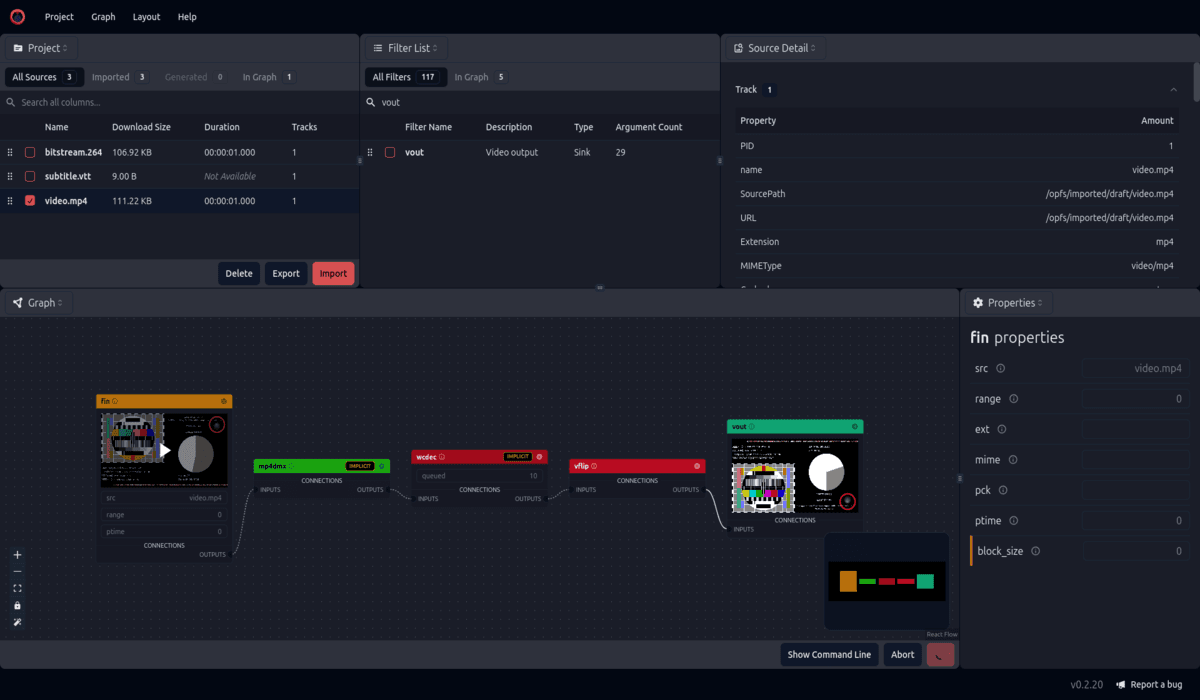
No installations, no command-line struggles—just open your browser and start processing. Our intuitive GUI and visual pipeline editor make media workflows easy. Based on the packager that Netflix uses for their live streaming, it's available at your fingertips.
Enhanced Capabilities
Leverage advanced media processing capabilities in a easy-to-use interface, making even complex tasks simple.
Fast WebCodecs Encoding
Encode media directly in your browser using WebCodecs, ensuring high-quality results with minimal processing time.
Visual Pipeline Editor
Build, modify, and preview your media processing workflows with an intuitive drag-and-drop interface. Instead of typing complex commands, you can visually connect processing steps, making it easier to experiment, debug, and fine-tune your workflows.